Starting out with SEO can feel like being handed a toolbox with no labels on anything. You know you need to optimize your website, but which tools actually matter when you’re just getting started — and don’t have a marketing budget yet?
The good news is that some of the most powerful SEO tools available are completely free, and many of them are built directly by Google itself. In this guide, you’ll learn about the best free SEO tools for beginners, what each one actually does, and how to use them together to build a solid SEO foundation without spending a dime.
Why Free Tools Are Enough When You’re Starting Out
There’s a common misconception that “real” SEO requires expensive software like Ahrefs or Semrush from day one. That’s simply not true.
When you’re new to SEO, your biggest challenges are usually foundational: making sure Google can find and index your site, fixing basic technical errors, understanding what keywords people actually search for, and tracking whether your traffic is improving. Free tools handle every one of these tasks well.
Paid tools become more valuable once you’re managing multiple sites, doing competitive research at scale, or need advanced backlink analysis. Until then, the tools below will cover roughly 80–90% of what a beginner needs.
Google Search Console: Your Starting Point
If you only install one tool, make it Google Search Console (GSC). It’s free, made by Google, and shows you exactly how your site performs in search results — data you genuinely can’t get anywhere else.
With Search Console, you can:
- See which queries bring people to your site, and your average position for each
- Submit sitemaps so Google can crawl your pages faster
- Identify indexing issues, like pages that aren’t showing up in search at all
- Spot mobile usability problems and security issues
- Request re-indexing after you publish or update content
Google Analytics 4: Understanding Your Traffic
Search Console tells you how you’re performing in search results. Google Analytics 4 (GA4) tells you what happens after someone clicks.
GA4 shows you where your traffic is coming from, which pages people spend the most time on, and where they drop off. For beginners, the most useful reports are:
- Acquisition reports — see whether traffic is coming from organic search, social, or direct visits
- Engagement reports — find out which pages actually hold attention
- Realtime report — confirm tracking is working correctly after setup
GA4 has a steeper learning curve than its predecessor, Universal Analytics, which Google fully sunset in July 2024. If you’re setting up analytics for the first time, GA4 is your only option now — but the free version is fully capable for a beginner’s needs.
Google Keyword Planner: Free Keyword Research
Keyword research tools are usually the first thing people want to pay for, but Google’s own Keyword Planner — built into Google Ads — is free and surprisingly solid for beginners.
You’ll need a Google Ads account to access it (no need to actually run ads), and it gives you:
- Search volume ranges for keywords
- Related keyword suggestions
- Competition level for paid ads, which loosely correlates with organic difficulty
The downside is that search volumes are shown in broad ranges rather than exact numbers unless you’re actively spending on ads. Still, for identifying keyword opportunities and understanding search intent, it’s a genuinely useful starting point before you invest in a dedicated keyword tool.
Ubersuggest and AnswerThePublic: Content Idea Generators
Once you know your target keywords, you need content ideas built around them. Two free tools stand out here.
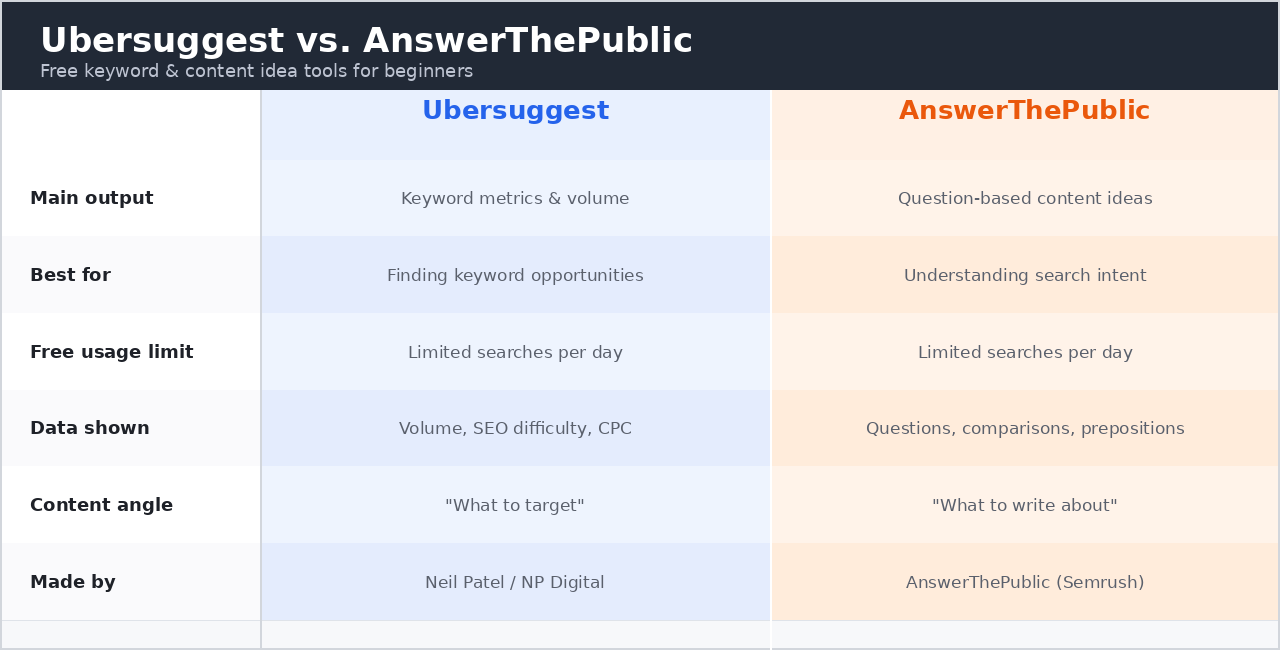
Ubersuggest, created by Neil Patel, offers a limited number of free searches per day and gives you keyword suggestions, content ideas, and a rough SEO difficulty score. It’s not as deep as paid tools, but it’s a solid free entry point.
AnswerThePublic visualizes real questions people type into search engines around a given keyword. This is particularly useful for beginners because it shows you the actual language your audience uses — which helps you write content that matches search intent rather than guessing.
[IMAGE: Side-by-side comparison chart of Ubersuggest vs. AnswerThePublic, showing what each tool outputs — keyword metrics vs. question-based content ideas]
If you want a deeper breakdown of how to turn these questions into actual blog topics, our guide on building a keyword-driven content strategy walks through the process in more detail.
Yoast SEO or Rank Math: On-Page Optimization
If your site runs on WordPress, an on-page SEO plugin is non-negotiable. The two most popular free options are Yoast SEO and Rank Math.
Both plugins give you:
- Real-time readability and SEO scoring as you write
- Meta title and description editing
- Automatic XML sitemap generation
- Basic schema markup
Rank Math’s free version tends to include more features out of the box (like more keyword tracking per post), while Yoast has a longer track record and a huge support community. Either one will meaningfully improve your on-page SEO without touching a line of code.
PageSpeed Insights and Core Web Vitals
Site speed is a confirmed ranking factor, and Google gives you a free tool to measure it directly: PageSpeed Insights.
Enter any URL, and it returns a performance score along with specific, actionable recommendations — things like compressing images, eliminating render-blocking resources, or reducing server response time. It also reports your Core Web Vitals, the specific metrics Google uses to judge user experience:
- Largest Contentful Paint (LCP) — how fast the main content loads
- Interaction to Next Paint (INP) — how responsive the page feels to user input (this replaced First Input Delay as an official Core Web Vital in March 2024)
- Cumulative Layout Shift (CLS) — how much the page visually shifts while loading
[SCREENSHOT: PageSpeed Insights results page, showing the performance score circle and the Core Web Vitals section with LCP, INP, and CLS metrics highlighted]
For a beginner, you don’t need to fix every single recommendation immediately. Focus on the “Opportunities” section first, since those tend to have the biggest impact on load time.
Screaming Frog SEO Spider: Free Technical Audits
Technical SEO sounds intimidating, but Screaming Frog’s SEO Spider makes it manageable. The free version crawls up to 500 URLs, which is plenty for most beginner sites or blogs.
It identifies:
- Broken links and redirect chains
- Missing or duplicate title tags and meta descriptions
- Pages missing alt text on images
- Duplicate content issues
It’s desktop software rather than a browser tool, so there’s a small learning curve, but running a crawl once a month is one of the fastest ways to catch technical issues before they hurt your rankings.
Bing Webmaster Tools: The Overlooked Option
Most beginners focus entirely on Google and skip Bing Webmaster Tools — but Bing still accounts for a meaningful share of desktop search traffic in the U.S., and the setup takes minutes since you can often import data directly from Search Console. It also includes a built-in SEO analyzer that flags basic on-page issues, making it a nice complement to Google’s own tools.
For a broader breakdown of how free and paid SEO tools stack up against each other as your site grows, this comparison of free vs. paid SEO tools is a genuinely useful reference point covering keyword research, technical audits, and rank tracking across both categories.
Putting It All Together
Here’s a simple workflow for combining these tools as a complete beginner:
- Set up Search Console and GA4 first to start collecting baseline data
- Research keywords using Keyword Planner and AnswerThePublic
- Optimize each page as you write using Yoast or Rank Math
- Check speed and technical health monthly with PageSpeed Insights and Screaming Frog
- Review performance in Search Console every few weeks to see what’s working
If you want a more detailed walkthrough of setting up your first SEO workflow from scratch, our guide on SEO basics for new websites covers the process step by step.
Final Thoughts
You genuinely don’t need a big budget to start doing SEO properly. The tools listed here — Search Console, GA4, Keyword Planner, Yoast or Rank Math, PageSpeed Insights, and Screaming Frog — cover research, on-page optimization, technical health, and performance tracking, which is essentially the full SEO cycle.
Start with Search Console and GA4 since everything else builds on the data they collect. From there, add tools gradually as you run into specific problems, rather than trying to master everything at once. That’s how most experienced SEOs actually built their skills in the first place.
Once you outgrow the limits of these free tools — and eventually you will — you’ll have a much clearer sense of exactly which paid features are worth paying for. For more comparisons of tools as your needs grow, browse our SEO tools directory.